
How to Get Verified on Facebook A Comprehensive Guide

How to Get Verified on Facebook: A Comprehensive Guide
In today’s digital age, having a verified Facebook account can greatly enhance your credibility, especially for businesses, public figures, and influencers. The blue verification tick indicates that Facebook has confirmed the authenticity of your account, helping you stand out from impersonators and fake accounts. If you’re wondering how to navigate the verification process, this guide will provide you with all the necessary steps and tips.
What is Facebook Verification?
Facebook verification is the process through which the platform authenticates the identity of certain users, granting them a blue checkmark next to their profile name. This verification is essential for individuals or brands who want to establish a trustworthy online presence. It not only boosts your credibility but also increases engagement with your audience.
Benefits of Verification
Getting verified on Facebook comes with several benefits, including:
- Credibility: A verified badge enhances your reputation and signals to your followers that your account is authentic.
- Protection: Helps prevent impersonation by ensuring that users can easily identify real accounts.
- Increased Visibility: Verified accounts are more likely to appear in search results, leading to greater visibility and potential follower growth.
- Access to Additional Features: Some features and tools are only available to verified users, further enhancing your ability to engage with your audience.
Eligibility Requirements
Before you begin the verification process, it’s important to understand the eligibility criteria set by Facebook. To be eligible for verification, you must meet the following requirements:

- Your account must be authentic and represent a real person, registered business, or entity.
- Your account must be unique, meaning it represents the only presence of that person or business on Facebook.
- Your account must be complete with a profile picture, cover photo, and a minimum number of followers (this varies for personal accounts and businesses).
- Your account must adhere to Facebook’s community standards and terms of service.
Steps to Verify Your Facebook Account
Once you determine that you meet the eligibility requirements, follow these steps to verify your account:
Step 1: Prepare Your Account
Ensure that your account is fully set up and meets all of Facebook’s requirements. This includes:
- Having a complete profile and cover photo.
- Engaging with your audience regularly.
- Having a steady flow of followers or likes on your page.
Step 2: Visit the Verification Request Page
To start the verification process, go to the How to Verify Your Facebook Account (Blue Tick) https://crazyfb.shop/en/page/kak-podtverdit-akkaunt-facebook-blue-tick. This page contains instructions and a form to fill out for your verification request.
Step 3: Fill Out the Verification Request Form
As you fill out the verification request form, be sure to include the following information:
- Your account name and details.
- A brief explanation of why you believe your account should be verified.
- Links to your website or other social media accounts that demonstrate your identity.
- Any relevant identification documents, such as a government-issued ID or business documents, depending on whether you are a person or a business.
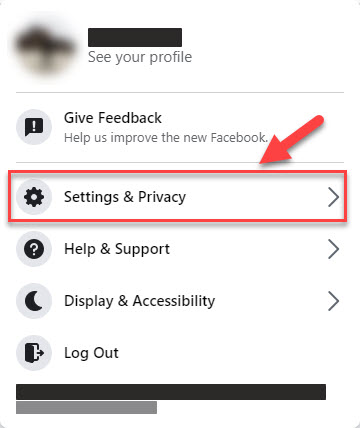
Step 4: Submit Your Request
After you have completed the form and attached any necessary documents, review your submission to ensure everything is correct. Once you’re satisfied, click on the “Submit” button. Facebook will then review your application.
Step 5: Await a Response
Facebook typically takes a few days to review verification requests. You will receive a notification regarding the status of your application. If approved, you’ll see the blue verification tick next to your account name. If your request is denied, you can reapply after 30 days.
Tips for a Successful Verification Application
While there’s no guaranteed way to get verified, following these tips can increase your chances of approval:
- Be Active: Engage with your followers regularly and consistently post content.
- Establish an Online Presence: Use other social media platforms to help bolster your credibility.
- Follow Guidelines: Adhere strictly to Facebook’s community standards and guidelines.
- Provide Proof of Notability: If you’re a public figure or brand, provide links to news articles or interviews that mention you.
Common Mistakes to Avoid
As you prepare your application, be mindful of these common mistakes that can lead to a denial of your verification request:
- Submitting an incomplete application or lacking required documents.
- Using a personal profile for business purposes instead of creating a dedicated business page.
- Submitting a request too soon or immediately after making significant changes to your account.
Conclusion
Verifying your Facebook account can provide significant advantages in establishing and maintaining your online presence. By following this comprehensive guide, understanding the eligibility requirements, and preparing your application carefully, you can increase your chances of receiving that important blue verification tick. Remember to be patient during the review process and stay active on your account to showcase its credibility.
For more detailed information, visit the source: https://crazyfb.shop/en/page/kak-podtverdit-akkaunt-facebook-blue-tick.